 Skip to content
Open, explore, and export DeltaV historian data right on your desktop.
Bravura AI Historian Explorer opens DeltaV Continuous Historian .xfc archive files directly. No historian server, no database, no cloud. Point it at a folder of exports and instantly browse every tag, inspect metadata, chart trends, and export to CSV, Excel, or SQLite. Fully offline.
Windows 10 / 11 (64-bit) | Runs fully offline / air-gapped
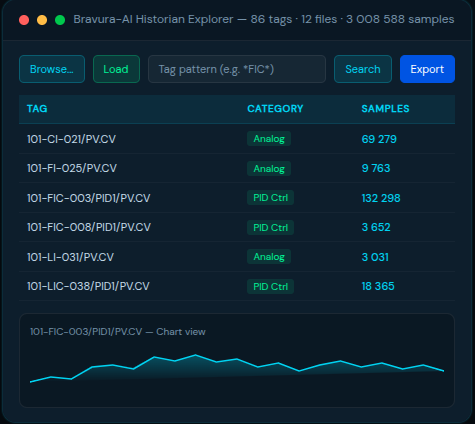
Built for control-systems engineers
No server, no setup
Point at your .xfc export folder and go. No historian server, database, or cloud account required.
Reads native .xfc
Opens DeltaV Continuous Historian archive files directly — the exact files your plant already produces.
Fully offline / air-gapped
Node-locked license file, no cloud, no phone-home. Fits locked-down OT networks and PSM-audited workstations.
Fast on big data
Export anywhere
Raw export to CSV (long or wide), Excel
(per-tag or all-in-one), and a raw SQLite
database is included on every paid tier.
Metadata at a glance
Interactive chart with overview brush
Zoom into a window, navigate via the
overview brush below, see live stats (count,
min, max, mean, span) for the visible range.
Advanced Export
Resample on the way out (linear, step/LOCF, nearest, time-weighted average, min/max/count, auto) with boundary fill, quality filtering, and despike / deadband/ swinging-door noise filters. Included with Pro and Site, or an add-on on Lite and subscriptions.
Chat with your historian data in plain English
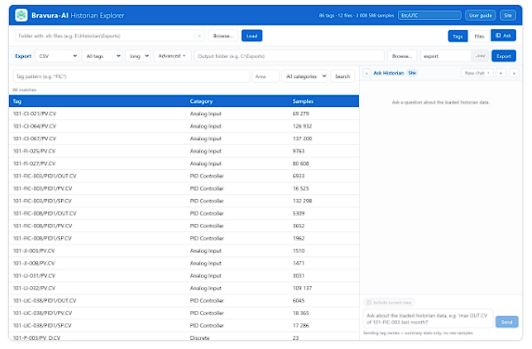
Ask Historian sits next to Tags and Files. Ask
in plain English; answers cite the source file.
BYOK across seven providers, or the
Bravura-hosted option; privacy default
sends only tag names and summary stats. A local-model option is planned.
Look at the data the way you want
Interactive chart with overview brush

Display time zone
XFC data is stored in UTC. A searchable picker in the header lets you
display in Local, UTC, or any IANA time zone. Chart axis labels and
every metadata time re-render in the chosen zone, and the choice
persists across launches per workstation.
Chat with your historian data in plain English
A chat tab next to Tags and Files
A right-side chat dock follows you across the app. The Tag and File
detail views have Ask about this tag and Ask about this file buttons that
pre-seed the chat with context. Every assistant reply carries a per-turn
privacy footer that spells out exactly what left your machine.
Pick your Al provider

Three privacy modes
Your key, your bill
Bravura's key, one invoice
Ollama on the workstation
Site Air-Gap mode and the Site Air-Gap Bundle are on the roadmap for customers who cannot let chat traffic leave the plant network.When they land, a
workstation in that mode will be locked to local-only with no path to the cloud, and the kill switch will be enforced from the license itself (not just hidden in
the UI). The bundle ships a packaged local model on top. Today, Ask Historian still needs an internet connection to reach the chosen provider.
Tag names plus summary stats only
- Default mode sends only tag names and server-computed summary stats. Raw historian samples are never sent.
- If you explicitly ask for a chart or plot, raw values may be included, but they are hard-capped at a 200-point down-sample. There is no path to ship a full series upstream.
- Every chat session writes a structured audit log (timestamp, model, provider, tool calls, payloads sent and received). Export the whole session as a ZIP from the License panel; this is the artifact pharma and GxP customers hand to QA.
- Telemetry is opt-in and off by default. When enabled, only anonymized tool name plus latency plus token-bucket metrics ship. Arguments and values never leave the machine.
Open the Ask tab to chat with your loaded historian data.
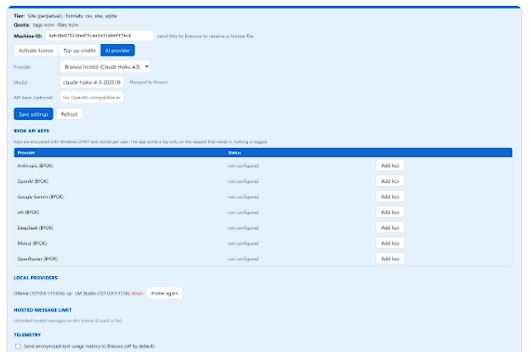
Al provider settings: provider, model, key (write-only), and telemetry consent.
External clients via a bundled MCP server
A bundled stdio MCP server lets Claude Desktop, Cursor, Cline, and other MCP clients connect to your loaded .xfc data and use the same tools the in-app
Ask uses. Per-client tokens are minted from the License panel.
Included on Pro, Site, and all subscription tiers. Add-on on Free and Lite: +$99 one-time or +$5 per month.
From raw historian file to export-ready data in under a minute.
Point to your .xfc folder
Browse, search, chart
Export to CSV / Excel / SQLite
A clean, native Windows interface built for browsing real plant history.
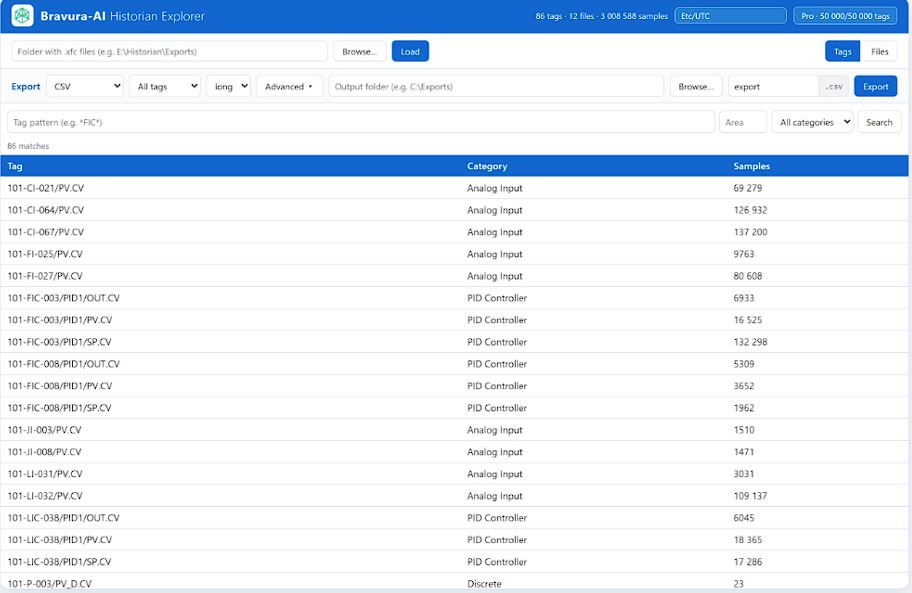
Browsing is always free. Take the data anywhere.
Browsing is always free. When you’re ready to take the data with
you, export the exact tags and ranges you need.

SQLite database
A clean Source/ Tag / Sample schema you can query directly or load into analytics and BI tools. Export it raw (HIST-faithful) or as a derived resampled database.
CSV
Long or wide layout, for scripts, spreadsheets, and quick checks.
Excel
One sheet per tag, or everything in a single workbook.

Browse and search every historian tag
Browsing is always free.
Pay when
you're ready to export.
Quotas are the number of distinct files / tags you may unlock for export.
| Tier | Quota (files / tags) | Hosted message bucket | Price |
|---|---|---|---|
| Free demo | 1 file / 10 tags (15-min sessions) | 2 lifetime | $0 |
| Lite | 50 files / 2,000 tags | BYOK only (no hosted) | $249 |
| Pro | 500 files / 50,000 tags | 200 lifetime | $799 |
| Pro + Maintenance | 500 files / 50,000 tags | 500 / month, renewable | $799 + $160/yr |
| Site | Unlimited (+ multi-seat) | 750 lifetime | $2,499 |
| Site + Maintenance | Unlimited (+ multi-seat) | 2,000 / seat / month, renewable | $2,499 + $500/yr/seat |
| Plan | Quota / month | Advanced Export | Price |
|---|---|---|---|
| Pro Monthly | 200 files / 20,000 tags | +$10/mo add-on | $45/mo |
| Pro Annual | 200 files / 20,000 tags | +$10/mo add-on | $449/yr |
| Team Annual (5 seats) | Pooled 1,000 files / 100,000 tags | +$10/mo add-on | $1,490/yr |
| Site Annual | Unlimited | +$10/mo add-on | from $3,900/yr |
| Tier | Ask Historian | Hosted Message Bucket | External MCP |
|---|---|---|---|
| Free demo | Hosted only, no BYOK | 2 lifetime | Add-on |
| Lite | BYOK only (add-on: +$199 one-time or +$10/mo) | No hosted bucket | Add-on: +$99 one-time or +$5/mo |
| Pro | Included | 200 lifetime | Included |
| Pro + Maintenance | Included | 500/month, renewable | Included |
| Pro Monthly | Included | 200/month | Included |
| Pro Annual | Included | 500/month | Included |
| Team Annual (5 seats) | Included | 1,500/month pooled | Included |
| Site | Included | 750 lifetime | Included |
| Site + Maintenance | Included | 2,000/seat/month, renewable | Included |
| Site Annual | Included | 2,000/seat/month | Included |
| Site Air-Gap Bundle PLANNED | Included + local model | n/a (local only) | Included |
Advanced Export (resampling + filters) is included with Pro, Pro + Maintenance, Site, and Site + Maintenance. Add it to Lite for +$199 one-time. Raw export (whole-file and per-tag CSV, sheet-per-tag Excel, and raw HIST-faithful SQLite database) is available on every paid tier.
Maintenance is an optional annual subscription for perpetual Pro and Site licenses. It converts the lifetime hosted bucket into a monthly renewable one and includes updates while active. Renewal preserves your consumption history.
Top-up packs: Files +100 = $99 · Tags +10,000 = $99 · Combo (+50 files / +5,000 tags) = $129 · Hosted messages +500 = $15.
Node-locked, file-based activation. Works on air-gapped machines.
Perpetual or subscription, node-locked to a machine. Licenses are
delivered as a file, so activation works on air-gapped / offline PCs. No
internet round-trip, no activation server to reach from the plant
network. Quotas can be topped up at any time.
The License panel hosts two surfaces worth knowing about. A new Al
provider tab next to Activate and Top-up credits holds the provider and
model picker, write-only BYOK key fields (the UI shows configured or
not configured, never the key itself), a hosted-usage indicator, and the
telemetry consent toggle. A new Remove license button (visible only
when a tier other than Free is active) deactivates the license in one
click and reverts the workstation to Free, for moving a seat to another
machine.
Site Air-Gap mode and the Site Air-Gap Bundle are planned for
customers who need Ask Historian to never reach the internet. Today,
Ask Historian still requires a provider connection; the air-gap kill switch
and the bundled local model land in a future release.
Got questions?
Do I need a historian server or database?
Does it work offline / on air-gapped PCs?
What can I export?
What OS does it run on?
How is it licensed?
What is maintenance and do I need it?
How big a dataset can it handle?
What is "Advanced Export"?
Can I still export without the add-on?
How do I choose the .xfc folder?
Can I zoom into a section of the chart?
Which time zone are the timestamps shown in?
Can I use the historian without an internet connection?
Do you store my Anthropic / OpenAl key?
What's the privacy default when I use Ask Historian?
Default mode sends only tag names and server-computed summary stats. Raw historian samples are never sent unless you explicitly ask for a chart or plot (hard-capped at 200-point downsample). Every chat session writes a structured audit log. Telemetry is opt-in and off by default.
Start rationalizing your alarms today.
- Windows 10/11 (64-bit) • 97 MB installer
- Runs fully offline once installed
- No credit card; upgrade with a license file when ready
Need a quote or a 30-day full-feature trial? Build your license or contact support.