 Skip to content
Rationalize your DeltaV alarms in an afternoon, not a project.
Drop in your FHX export and start building an ISA-18.2 master alarm database in five minutes. No spreadsheets. No CSV prep. No consultants required to begin.
No export handy? Try it instantly with the bundled sample data.
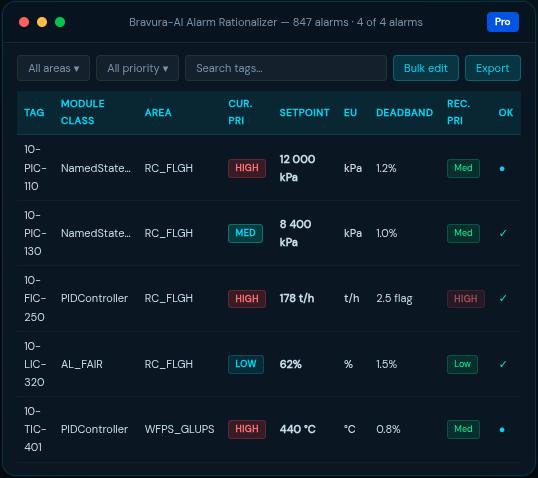
Native FHX import.
Zero data prep.
Every competitor and every Excel workflow makes you manually extract, clean, and column-map an alarm list first. Bravura reads the DeltaV export you already have and auto-fills tag, module class, area, current priority, setpoint, engineering-unit scale, and deadband, on your own machine, with no DCS connection.
Built for real plant exports: A cancellable import with a live progress overlay stays responsive on multi-gigabyte FHX files of tens of thousands of alarms, with data-quality warnings surfaced instead of swallowed.
From FHX to first rationalized alarm in 5 minutes.
Design-time, complements your runtime monitor: Your runtime tool (DeltaV Analyze, PAS, ProcessVue) tells you which alarms are bad. This is where you decide what each alarm should be, and prove it.
Built for the people who actually have to defend the alarm list, not the people who only have to monitor it.
Native FHX import
The only tool that reads the DeltaV export directly, recovering the EU scale, setpoints, and deadband that the standard DeltaV view drops.
Single-user, published price
Self-serve desktop, no quote-only sales gate, no consulting bundle to start. Buy the license, install, work.
Truly offline, air-gapped
Node-locked license file, no cloud, no phone-home. Fits locked-down OT networks and PSM-audited workstations.
Round-trip back to DeltaV
A full ISA-18.2/IEC-62682 workflow with an audit-defensible trail, then a DeltaV write-back FHX with your rationalized priorities and limits.
Six capabilities that turn a DeltaV export into a defensible alarm rationalization deliverable.
Auto-built MADB grid
Every alarm with dedicated Setpoint, EU scale, and Deadband columns, current vs recommended priority. Column sorting (priority by severity rank), find-as-you-type, and multi-select bulk edit with a safe copy-to-class: dry-run preview, fill-blanks vs overwrite, and skipping Approved targets so you cannot accidentally clobber signed-off work.
Import a runtime alarm-frequency CSV to sort and tackle the worst bad actors first, and a flag highlights alarms whose annunciation is partially suppressed (non-default mask).


Guided rationalization
The mandatory ISA-18.2 9.2.1 fields and recommended 9.2.2 fields grouped Required / Recommended / Additional, a consequence x time-to-respond priority matrix that persists and reloads, alarm classification, and per-plant-state variants (Normal, Startup, Shutdown, Maintenance).
Mandatory fields are highlighted until complete; rejecting an alarm requires a written basis. Prev/next plus next same priority and next unrationalized let you work through the whole list without leaving the form.
Functional safety (HAZOP / LOPA)
A Layer-of-Protection-Analysis worksheet per IEC 61511 / CCPS. Compute the mitigated event frequency, risk gap, and recommended SIL. Credit an alarm’s operator response as an Independent Protection Layer only when it meets the ISA-18.2 criteria: independent of the cause, Highly Managed Alarm, and adequate time to respond.
Audit-defensible by design
Approve is blocked until the six mandatory 9.2.1 fields are complete; the button shows exactly what is missing. Approvals capture the approver name and timestamp (a per-machine reviewer name, not a generic “engineer”).
One-click whole-project audit-trail export carries a document-control header (project, revision, source FHX path and SHA-256) so MoC and PSM reviewers can confirm exactly which build the artefact came from.
Benchmark Dashboard
Priority distribution mapped to the ISA-18.2 Table-6 target (as-configured vs rationalized) with a within-budget verdict, plus chatter/deadband and completeness proxies.


Versioning and multi-project
Multi-project manager, baselines, and revision diffs covering priority, setpoint, deadband, delay, EU scale, MASK, and INV (not just priority). Re-import an updated FHX any time and carry rationalization forward without losing approvals; the re-review queue flags any rationalization whose as-built values drifted, and import surfaces data-quality warnings instead of silently swallowing them.
Exports that close the loop
MADB to CSV and a real Excel workbook (Document-Control sheet, typed numerics, AutoFilter, column widths, priority colouring; not a glorified CSV). A branded Alarm Response Manual plus priority-distribution and gap/drift reports, with document-control headers and optional per-project branding (company name and accent colour). In-app PDF export of the Alarm Response Manual and the reports, ready to attach to MoC paperwork. A DeltaV write-back FHX with priority changes plus disabling alarms you rejected. And a whole-project audit trail with a per-revision change log.
First-run onboarding and a built-in user guide
A short first-run walkthrough takes a new user from FHX to their first rationalized alarm without reading documentation. A built-in user guide is one click away inside the app.

Bravura speaks the language your MoC and PSM reviewers use.
Bravura speaks the language of ANSI/ISA-18.2, IEC 62682, and EEMUA-191: alarm philosophy, master alarm database, priority matrix, rationalization fields, performance metrics, and management of change.
Runs fully offline on air-gapped OT networks. Your alarm data never leaves your machine.
Management of alarm systems for the process industries
Management of alarm systems for the process industries
Alarm systems: a guide to design, management & procurement
Functional safety; LOPA, Independent Protection Layers, SIL
Self-serve, published pricing.
No quote required
Pick a tier, install on your workstation, get started.
Try it now
- Use your own FHX or the bundled sample
- Limited exports (CSV only)
- All rationalization features for evaluation
- Fully offline, no account, no phone-home
Single Workstation
- All exports: CSV, Excel, Alarm Response Manual, gap/drift reports, audit trail
- DeltaV write-back FHX (round-trip)
- Unlimited projects and alarms
- Priority support, all updates included
Up to - 5 seats
- Everything in Pro
- Organization license, named support contact
- Project sharing between seats
- Volume discount above 5 seats on request
Also available: Lite, a one-time $900 single-workstation license with CSV / Excel exports (no DeltaV write-back). And a sales-issued 30-day full-feature trial for procurement-led evaluations. Contact sales.

Node-locked to a machine.
Works air-gapped.
Node-locked to a machine. License is delivered as a file, so activation works on air-gapped / offline PCs. No activation server to reach from the plant network, no online check that breaks your audit posture.
Got questions?
Does it really run fully offline?
What happens to my alarm data?
Which DeltaV versions/FHX exports are supported?
How is this different from a runtime alarm monitor?
How large an FHX export can it handle?
Can I refund?
Do I need internet to install or use it?
Start rationalizing your alarms today.
Tell us where to reach you and the demo download will unlock right here. Try Bravura on your own FHX or the bundled sample data; full rationalization features for evaluation, with CSV-only exports.
- Windows 10 / 11 (64-bit) · 22 MB installer
- Runs fully offline once installed
- No credit card; upgrade with a license file when ready
Need a quote or a 30-day full-feature trial? Build your license below or contact support.