 Skip to content

Windows desktop app | ANSI/ISA-18.2 | IEC 62682
Rationalize your DeltaV alarms to ISA-18.2, on your own desktop.
Drop in your FHX export and start building an ISA-18.2 master alarm database. No spreadsheets. No CSV prep.
Monthly subscription. Windows 10 / 11 (64-bit).
From FHX to first rationalized alarm
PlantUnity Alarm Rationalizer reads the DeltaV export you already have and auto-fills tag, module class, area, current priority, setpoint, engineering-unit scale, and deadband, on your own machine, with no DCS connection.
Design-time, complements your runtime monitor. Your runtime tool (DeltaV Analyze, PAS, ProcessVue) tells you which alarms are bad. This is where you decide what each alarm should be, and prove it. Aligned with ANSI/ISA-18.2 and IEC 62682, with an EEMUA-191 default priority matrix and LOPA per IEC 61511.
Native FHX import
Reads the DeltaV FHX export directly, without manual CSV preparation, and recovers the EU scale, setpoints and deadband. The import is cancellable, shows a live progress overlay, and surfaces data-quality warnings instead of swallowing them.
Round-trip back to DeltaV
An import-faithful write-back FHX, with a full ISA-18.2 / IEC-62682 workflow and an audit-defensible trail.
Auto-built MADB grid
Every alarm with dedicated Setpoint, EU scale, and Deadband columns, current vs recommended priority. Column sorting, find-as-you-type, and multi-select bulk edit with a safe copy-to-class: dry-run preview, fill-blanks vs overwrite, and skipping Approved targets so you cannot accidentally clobber signed-off work.
Guided rationalization
The mandatory ISA-18.2 9.2.1 fields and recommended 9.2.2 fields grouped Required / Recommended / Additional, a consequence x time-to-respond priority matrix that persists and reloads, alarm classification, and per-plant-state variants (Normal, Startup, Shutdown, Maintenance). Rejecting an alarm requires a written basis.
Functional safety (HAZOP / LOPA)
A Layer-of-Protection-Analysis worksheet per IEC 61511 / CCPS. Compute the mitigated event frequency, risk gap, and recommended SIL. Credit an alarm's operator response as an Independent Protection Layer only when it meets the ISA-18.2 criteria.
Audit-defensible by design
Approve is blocked until the six mandatory 9.2.1 fields are complete; the button shows exactly what is missing. Approvals capture the approver name and timestamp. One-click whole-project audit-trail export carries a document-control header (project, revision, source FHX path and SHA-256) so MoC and PSM reviewers can confirm exactly which build the artefact came from.
Benchmark dashboard
Priority distribution mapped to the ISA-18.2 Table-6 target (as-configured vs rationalized) with a within-budget verdict, plus chatter / deadband and completeness proxies.
Versioning and multi-project
Multi-project manager, baselines, and revision diffs covering priority, setpoint, deadband, delay, EU scale, MASK, and INV (not just priority). Re-import an updated FHX any time and carry rationalization forward without losing approvals.
DeltaV-aware write-back
The write-back sends only what DeltaV will actually accept, as a minimal, merge-safe override (only the changed priority, or a disable), not a full alarm replace. It flags on each alarm exactly what cannot be re-imported and why, before you export.
Exports that close the loop
MADB to CSV and a real Excel workbook, a branded Alarm Response Manual plus priority-distribution and gap/drift reports, and in-app PDF export ready to attach to MoC paperwork. An import-faithful DeltaV write-back FHX.
First-run onboarding and a built-in user guide
A short first-run walkthrough takes a new user from FHX to their first rationalized alarm without reading documentation. A built-in user guide is one click away inside the app.
See it in action
Master Alarm Database, guided rationalization, functional safety, benchmark, projects and exports.
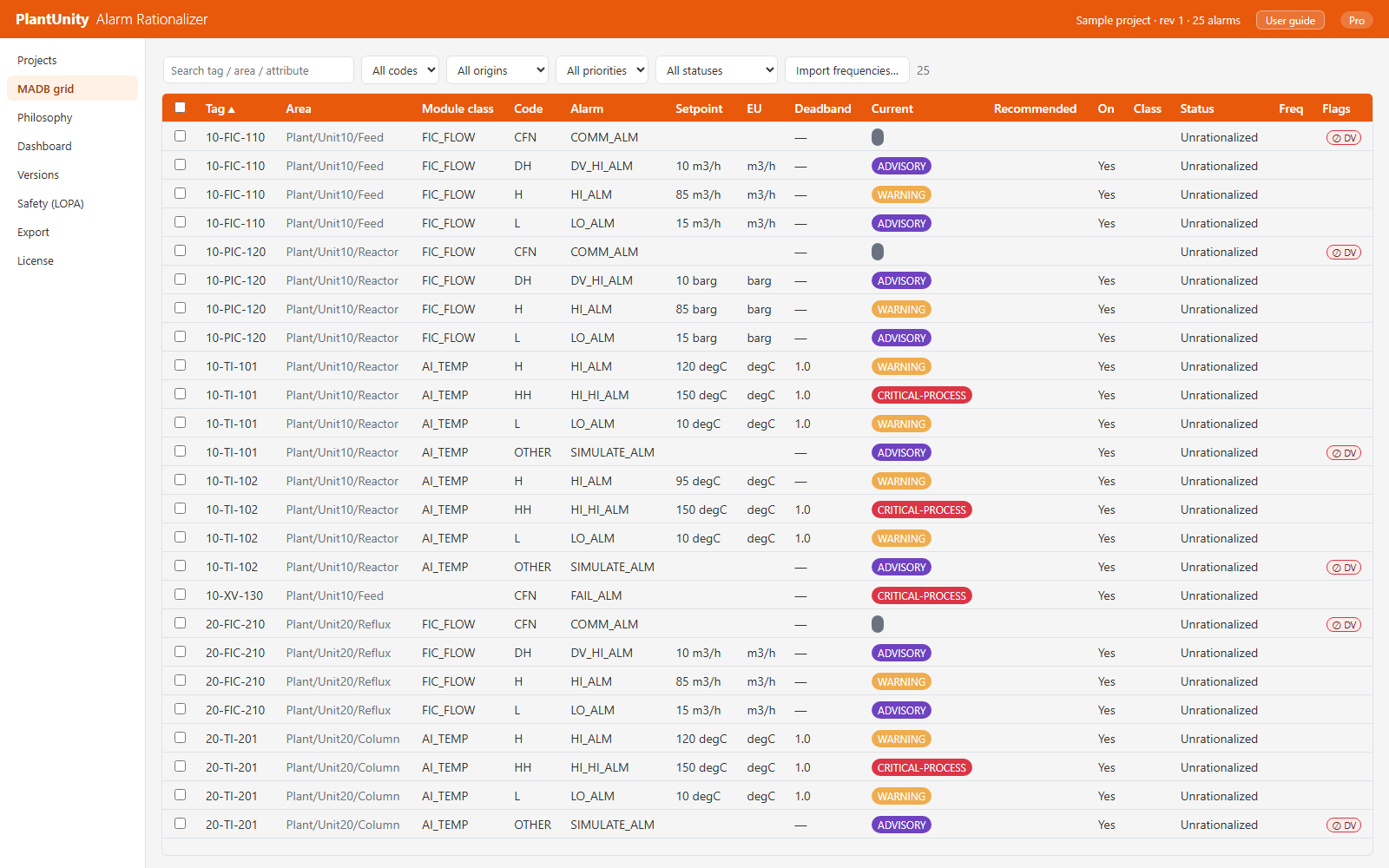
Master Alarm Database grid with tag, setpoint, engineering unit, deadband and current priority columns

Per-alarm rationalization editor (10-FIC-110 DV_HI_ALM): the as-built values from the FHX, the ISA-18.2 required fields and the consequence matrix

HAZOP / LOPA scenario worksheet: scenario, independent protection layers and the computed result (mitigated frequency, risk gap, SIL gap)

Review dashboard: priority distribution against the ISA-18.2 target, the as-configured distribution and the rationalization progress

Projects screen: new project from FHX, open a project, or try the sample data, with the list of recent projects

Exports: MADB, Alarm Response Manual, FHX write-back, and audit trail
Video guide
Watch the workflow end to end, from the DeltaV FHX export to an approved rationalization.
Part 1: FHX Export to Approved Rationalization
Pricing
PlantUnity Alarm Rationalizer is sold as a monthly subscription.
USD 49 / month
Subscription: all export formats, unlimited exports, SQL ingest and advanced export. Monthly subscription, activated online.
Free needs no account: one CSV export on this computer, and each session lasts up to 15 minutes.
FHX import, rationalization, the dashboard, versions and LOPA all work in Free. SQL ingest and advanced export are not included.
Combined multi-app pricing is coming soon.
Licensing
PlantUnity Alarm Rationalizer is a monthly subscription. You activate it online in the app.
Bought in the app: it activates by itself. Bought on the website: your activation key is shown once after payment and e-mailed to you; paste it into the app.
Your alarm data never leaves your computer; the app contacts the Bravura-AI licence service only to activate and renew Pro.
Download PlantUnity Alarm Rationalizer
Windows 10 / 11 (64-bit). The download page lists the version, size and SHA-256 of the installer.
User guide
Read the PlantUnity Alarm Rationalizer user guide as a PDF.
Frequently asked questions
Questions about PlantUnity Alarm Rationalizer?
Send us a message and we will reply by email.