 Skip to content

Windows desktop app | DeltaV Continuous Historian
Open, explore, and export DeltaV historian data, right on your desktop.
PlantUnity Historian Explorer opens DeltaV Continuous Historian .xfc archive files directly, with no historian server and no database to set up. Point it at a folder of exports and browse every tag, inspect metadata, chart trends, and export to CSV, Excel, or SQLite.
Monthly subscription. Windows 10 / 11 (64-bit).
Built for control-systems engineers
Everything you need to get DeltaV historian data off the plant floor and into your analysis, without standing up any infrastructure.
No server, no setup
Point at your .xfc export folder and go. No historian server or database is required.
Reads native .xfc
Opens DeltaV Continuous Historian archive files directly: the exact files your plant already produces.
Runs on your workstation
Browsing, charting and export run entirely on the workstation.
Export anywhere
Raw export to CSV (long or wide), Excel (per-tag or all-in-one) and a raw SQLite database with a clean Source / Tag / Sample schema.
Metadata at a glance
Per-file view (tags, sample counts, time spans) and per-tag view (which files contain it, ranges, min/max/mean).
Advanced Export
Resample on the way out (linear, step/LOCF, nearest, time-weighted average, min/max/count, auto) with boundary fill, quality filtering, and despike / deadband / swinging-door noise filters.
Interactive chart with overview brush
Zoom into a window, navigate via the overview brush below, see live stats (count, min, max, mean, span) for the visible range.
Display time zone
Pick any time zone (Local, UTC, or any IANA zone) from a searchable header picker; chart axes and metadata times re-render in your choice, and the choice persists.
Chat with your historian data in plain English
Ask Historian sits next to Tags and Files. Numeric answers name the source .xfc file. Use the Bravura-AI hosted option, your own key (BYOK) with seven cloud providers, or a local model through Ollama that needs no internet connection. The subscription includes 500 AI questions per month.
Your AI assistant, through MCP
MCP clients connect over HTTP to the MCP server that runs inside the app. The connection details and the token are in ~/.bravura-historian/mcp_external_manifest.json. There is no MCP panel in the app window. External MCP is not included in the Free tier.
You see what was sent
Answering a question may send tag names, time ranges, summary statistics and, when the analysis needs them, sample points to the provider you selected. The note under each answer shows exactly what was sent, and the session audit log keeps it.
See it in action
A clean, native Windows interface built for browsing historian data.
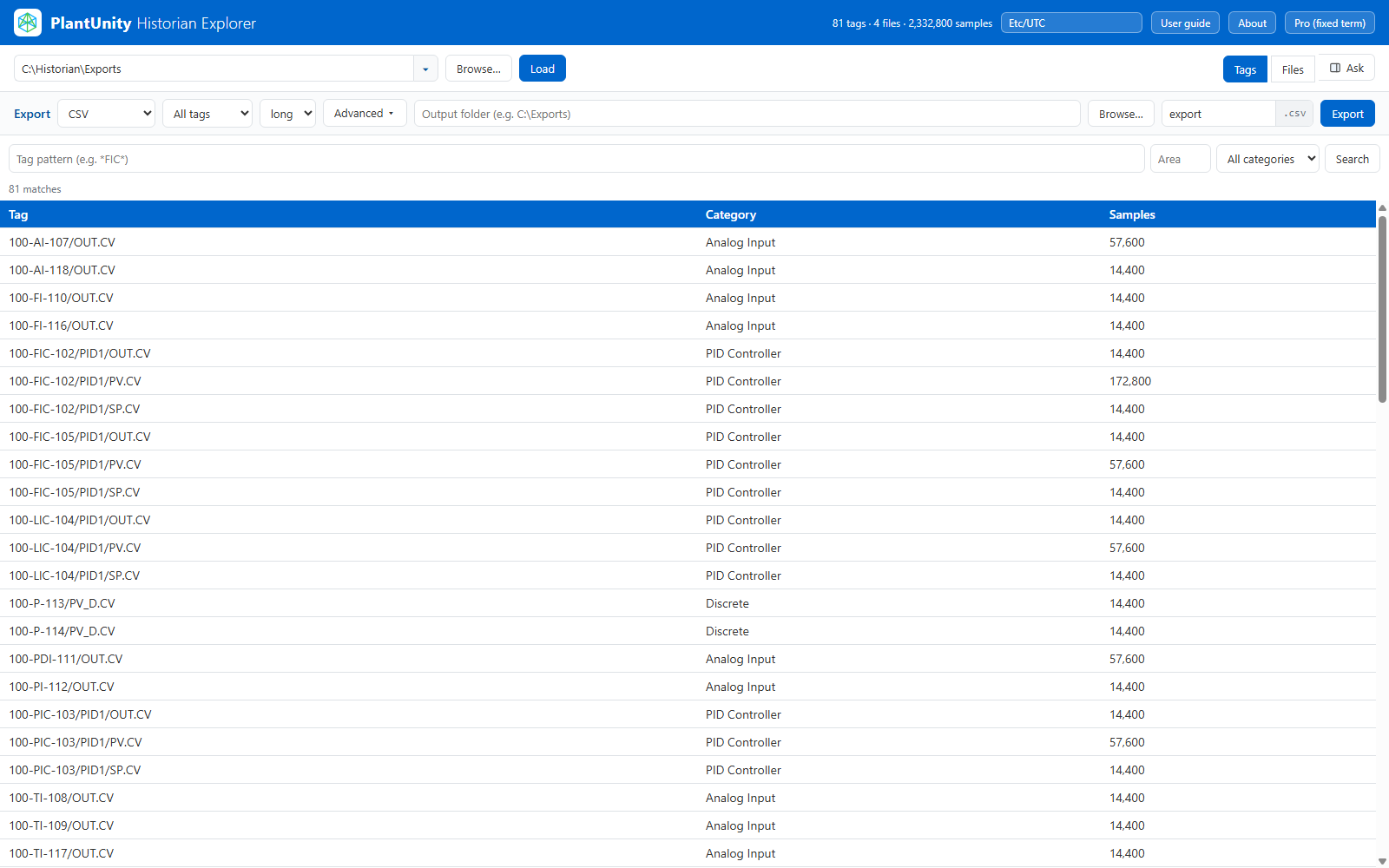
Browse and search every historian tag

Per-tag metadata and interactive trend charts

Chart resampling: the chart mode is set to previous (LOCF)

Export set to SQLite for the current tag, with an output folder and a file name

Zoom into a window, navigate via the overview brush, see live stats for the visible range

Ask Historian conversation: the tools it ran and an Apply to chart action
Video guides
Two short guides take you through the app, from opening your first .xfc folder to exporting data and asking questions.
Part 1: Load, search and chart Open a folder of .xfc files, search the tags and chart them.
Part 2: Export, ask and license Export to CSV, Excel or SQLite, ask questions about your data and activate a license.
Pricing
PlantUnity Historian Explorer is sold as a monthly subscription.
USD 79 / month
Monthly subscription. Each month it includes 10 GB of .xfc history data, 20,000 tags and 500 AI questions, with no carry-over to the next month.
Exports: CSV, XLSX and SQLite. Advanced Export and External MCP are included. 1 seat. No session limit.
Free tier: up to 100 MB of .xfc history data, 10 tags, 2 hosted AI questions per computer, CSV export only, 15-minute sessions, 1 seat. Advanced Export and External MCP are not included.
Combined multi-app pricing is coming soon.
Licensing
PlantUnity Historian Explorer is a monthly subscription. You activate it online in the app.
Bought in the app: it activates by itself. Bought on the website: your activation key is shown once after payment and e-mailed to you; paste it into the app.
Download PlantUnity Historian Explorer
Windows 10 / 11 (64-bit). The download page lists the version, size and SHA-256 of the installer.
User guide
Read the PlantUnity Historian Explorer user guide as a PDF.
Frequently asked questions
Questions about PlantUnity Historian Explorer?
Send us a message and we will reply by email.